

ChatGPT Business Hub in India: How to Claim Your Business Profile
ChatGPT Business Hub lets a business claim its profile in ChatGPT, keep its details accurate and see aggregate Insights. This guide explains who can claim from India, how verification works, what to prepare and what OpenAI has not confirmed. It is written for business owners and marketers in India.
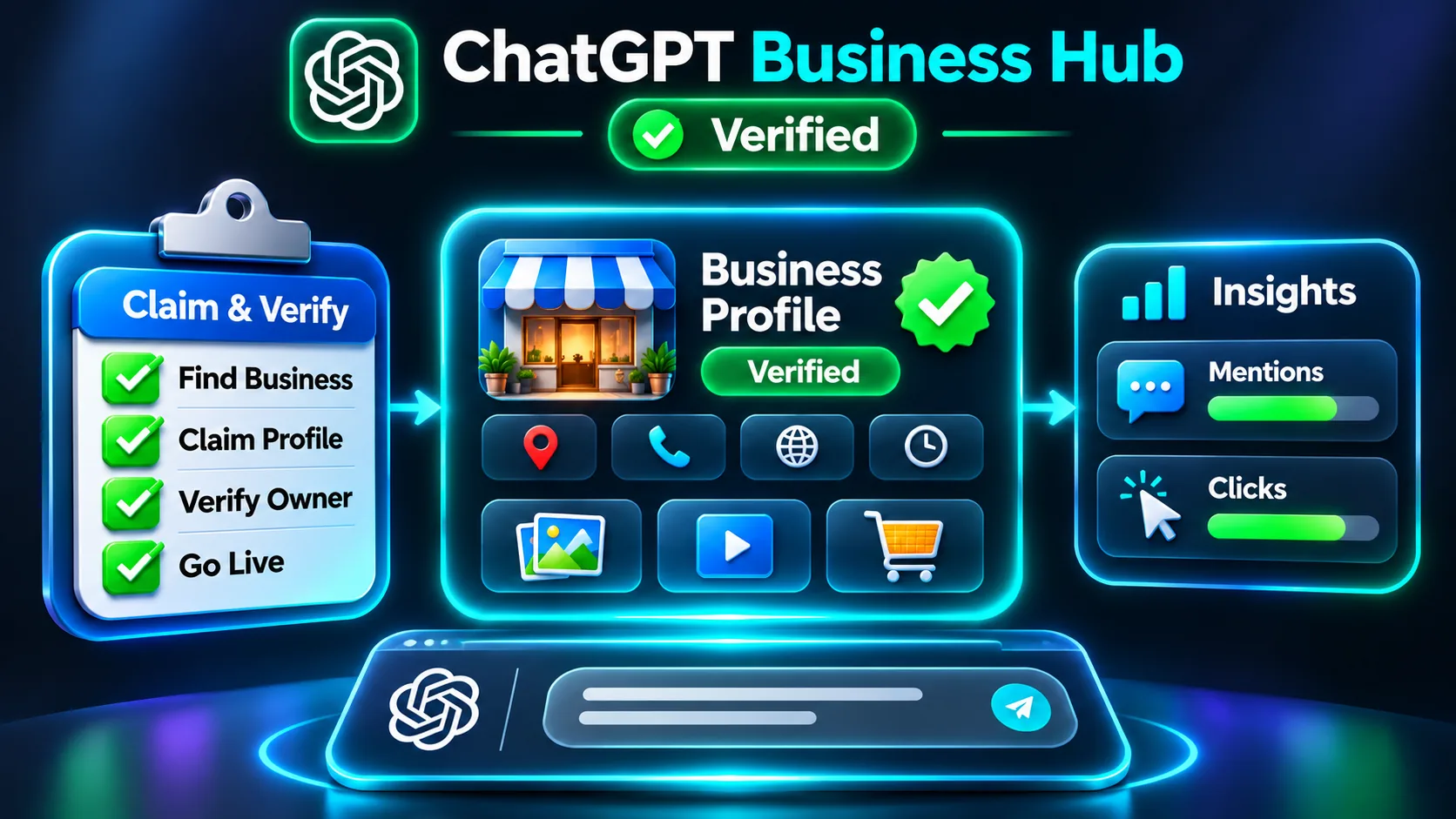
Alt text: Verified ChatGPT Business Hub dashboard: a claim and verify checklist (find business, claim profile, verify owner, go live), a business profile card and an Insights panel with mentions and clicks
AI image prompt
"16:9. A dark dashboard scene: a glowing business profile card with a verified badge in the centre, a checklist panel on the left and a small Insights panel with mentions and clicks bars on the right. Soft connecting lines suggest a profile feeding a chat window in the background. Highly vivid, hyper-realistic rendering combined with a clear infographic layout. Tell the story visually with large recognisable icons, realistic objects, arrows, checkmarks, colour-coded states and simple diagrams so a viewer understands the message without reading any paragraph; only very short 1-3 word labels are allowed. Dark-theme premium look: glass cards, soft glow, cyan (#22d3ee), blue (#3b82f6) and green (#4ade80) accents on deep navy (#080b14). High contrast, no real brand logos, no fabricated OpenAI or ChatGPT interface, no statistics."
Quick answer
- Short answer: ChatGPT Business Hub is OpenAI’s dashboard, in beta since 10 November 2026, where an owner or authorised representative claims a business in ChatGPT, keeps its details current and sees aggregate Insights.
- India: OpenAI says any eligible business located where ChatGPT is available can claim. Online businesses with their own website are the clearest fit. Local stores and restaurants can currently claim only an existing U.S. listing.
- Cost: OpenAI’s help article does not state a fee. Ads and ChatGPT Enterprise are not required to claim.
- Not a ranking switch: claiming does not guarantee ChatGPT will recommend you.
- Business Agents: limited to eligible U.S. ecommerce and online service businesses for now.
- Date checked: 24 November 2026. This is a beta, so screens and rules can change.
What is ChatGPT Business Hub?
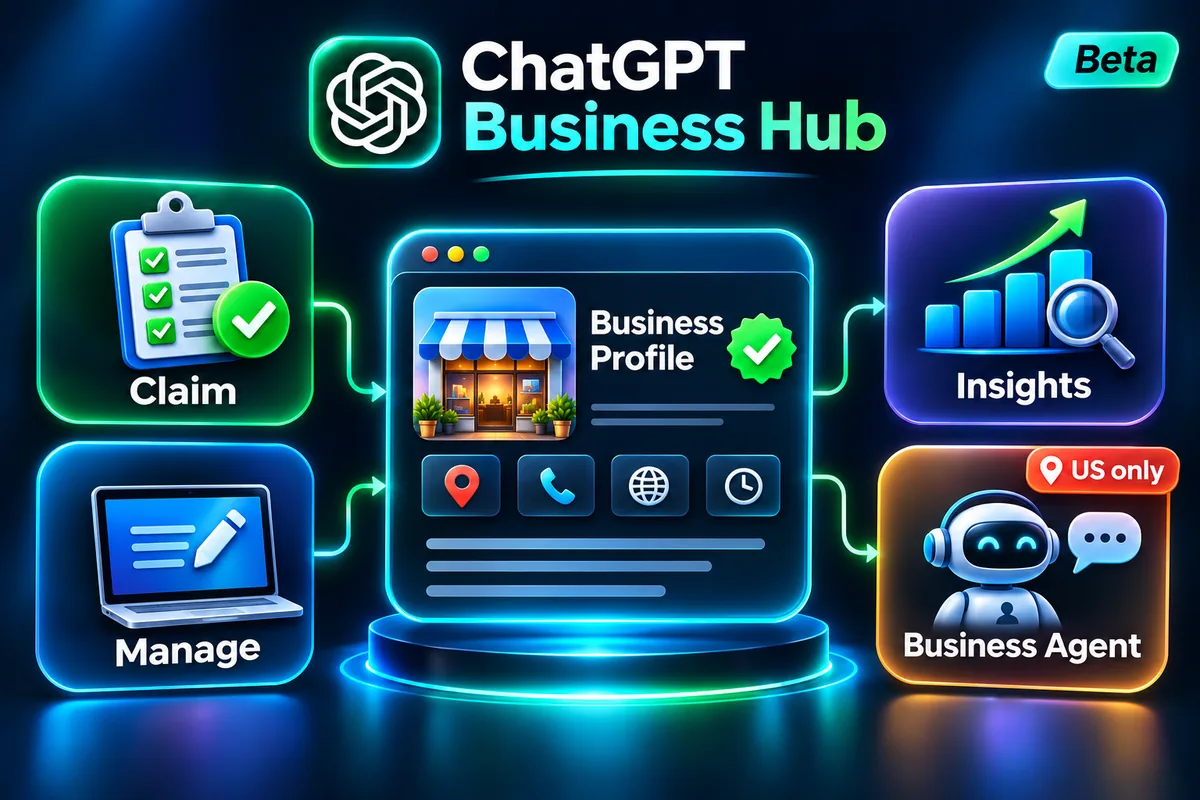
Alt text: ChatGPT Business Hub overview: a verified business profile in the centre linked to four blocks, Claim, Manage, Insights and Business Agent (US only), with a Beta tag
AI image prompt
"3:2 infographic with one central business profile card and four connected blocks labelled Claim, Manage, Insights and Business Agent. A small tag on the agent block reads US only. A small beta tag sits in the corner. Highly vivid, hyper-realistic rendering combined with a clear infographic layout. Tell the story visually with large recognisable icons, realistic objects, arrows, checkmarks, colour-coded states and simple diagrams so a viewer understands the message without reading any paragraph; only very short 1-3 word labels are allowed. Dark-theme premium look: glass cards, soft glow, cyan (#22d3ee), blue (#3b82f6) and green (#4ade80) accents on deep navy (#080b14). High contrast, no real brand logos, no fabricated OpenAI or ChatGPT interface, no invented statistics."
ChatGPT Business Hub is the place where a business claims its listing in ChatGPT, edits the facts ChatGPT can use about it and reviews how people engage with it. It sits at chatgpt.com/business-hub and in the ChatGPT sidebar. OpenAI launched it on 10 November 2026 as part of “Businesses in ChatGPT”, which is in beta.
- Claim: find your listing, prove you own it or represent it, then pass OpenAI’s review.
- Manage: update details such as website, description, category, logo and delivery or return policy. Verified businesses can also add a product feed.
- Measure: see aggregate mentions, website clicks and “discovery topics” for the past 28 days.
- Engage (US only for now): eligible businesses can launch a Business Agent that answers customer questions.
Business Hub vs ChatGPT Business plan vs ChatGPT Ads
Three OpenAI products have similar names, and search results mix them. They solve different problems.
| Product | What it is | Who it is for | Where we cover it |
|---|---|---|---|
| Business Hub (Businesses in ChatGPT) | A profile dashboard for how ChatGPT represents your business (OpenAI lists no fee) | Business owners who want accurate information in ChatGPT answers | This guide |
| ChatGPT Business (workspace plan) | A paid workspace plan for teams that use ChatGPT at work. OpenAI renamed it from ChatGPT Team in 2025 | Companies giving employees ChatGPT with admin controls | Not covered here. Ask us if you want a separate guide |
| ChatGPT Ads | Paid, labelled placements shown to some users | Advertisers buying reach | ChatGPT Ads in India guide |
One link between them: after claiming, eligible businesses can sponsor their Business Agent and use it as the destination for ChatGPT Ads, per OpenAI. Ads are not needed to claim.
Can Indian businesses claim a ChatGPT business profile?
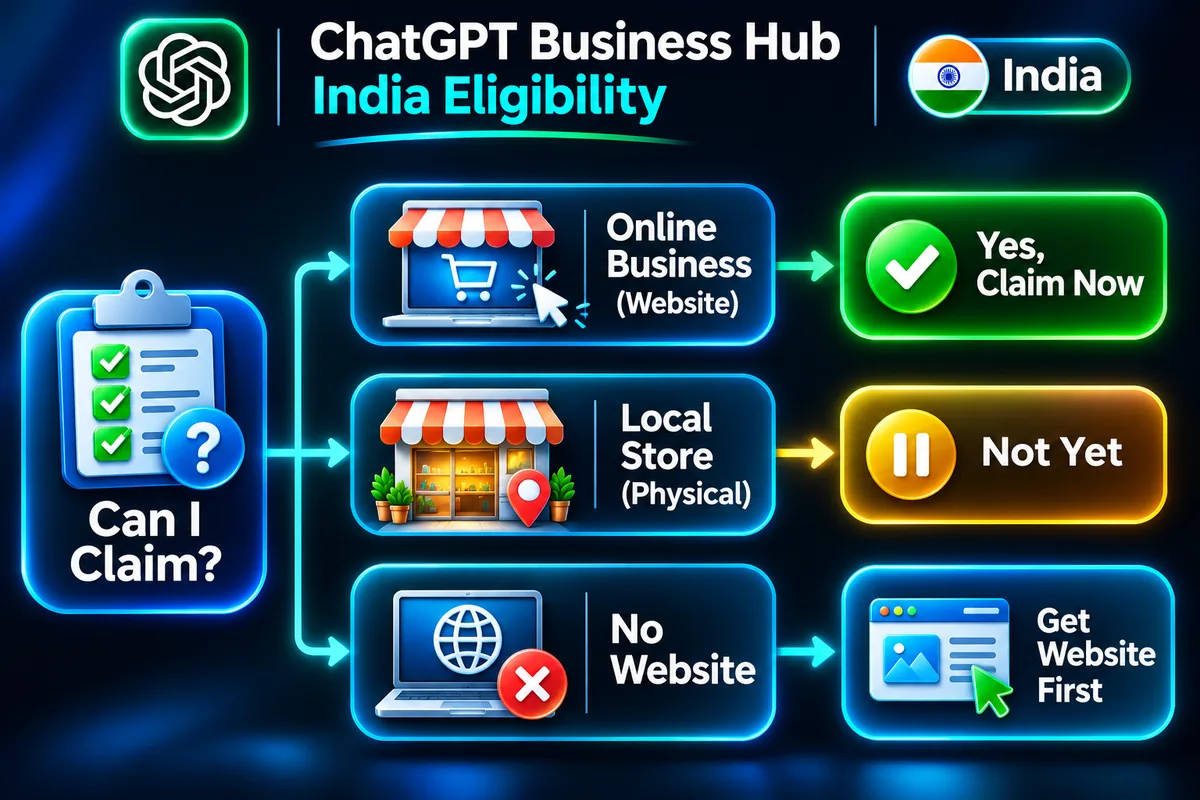
Alt text: Can I claim? flowchart for India: an online business with a website can claim now, a local physical store not yet, and a business with no website should get a website first
AI image prompt
"3:2 decision tree. One start node, then branches for online business with website, local store, and no website. The first branch ends in a green tick, the local-store branch ends in an amber pause icon, the no-website branch points to a website icon. Highly vivid, hyper-realistic rendering combined with a clear infographic layout. Tell the story visually with large recognisable icons, realistic objects, arrows, checkmarks, colour-coded states and simple diagrams so a viewer understands the message without reading any paragraph; only very short 1-3 word labels are allowed. Dark-theme premium look: glass cards, soft glow, cyan (#22d3ee), blue (#3b82f6) and green (#4ade80) accents on deep navy (#080b14). High contrast, no real brand logos, no fabricated OpenAI or ChatGPT interface, no invented statistics."
Possibly, depending on business type. OpenAI’s rule is wording-level: eligible businesses where ChatGPT is available. It does not publish an India-specific list. The table separates what OpenAI states from what we infer. Date checked: 24 November 2026.
| Business type | Likely route | Evidence |
|---|---|---|
| Online store or ecommerce brand with its own website | Claim as an online business | OpenAI: ecommerce and online service businesses can claim. India acceptance in practice: NOT TESTED by us |
| Online service firm (agency, SaaS, coaching, consultancy) with a website | Claim as an online business | Same as above |
| Local shop, restaurant, clinic or salon in India | Not open yet | OpenAI: local stores and restaurants can currently claim only an existing U.S. listing |
| Seller with only Instagram or WhatsApp, no website | Build a website you can verify first | Verification uses business phone, email, website domain (DNS) or Shopify. A domain you control is the most flexible route (our inference) |
| Multi-branch or service-area business | Unclear | No detail from OpenAI. UNVERIFIED |
Two cautions. First, being eligible does not mean approval, because OpenAI reviews each claim. Second, which Indian documents satisfy the identity check is NOT TESTED; OpenAI says you may need a government-issued ID and business registration information.
How to claim your business in ChatGPT: step by step
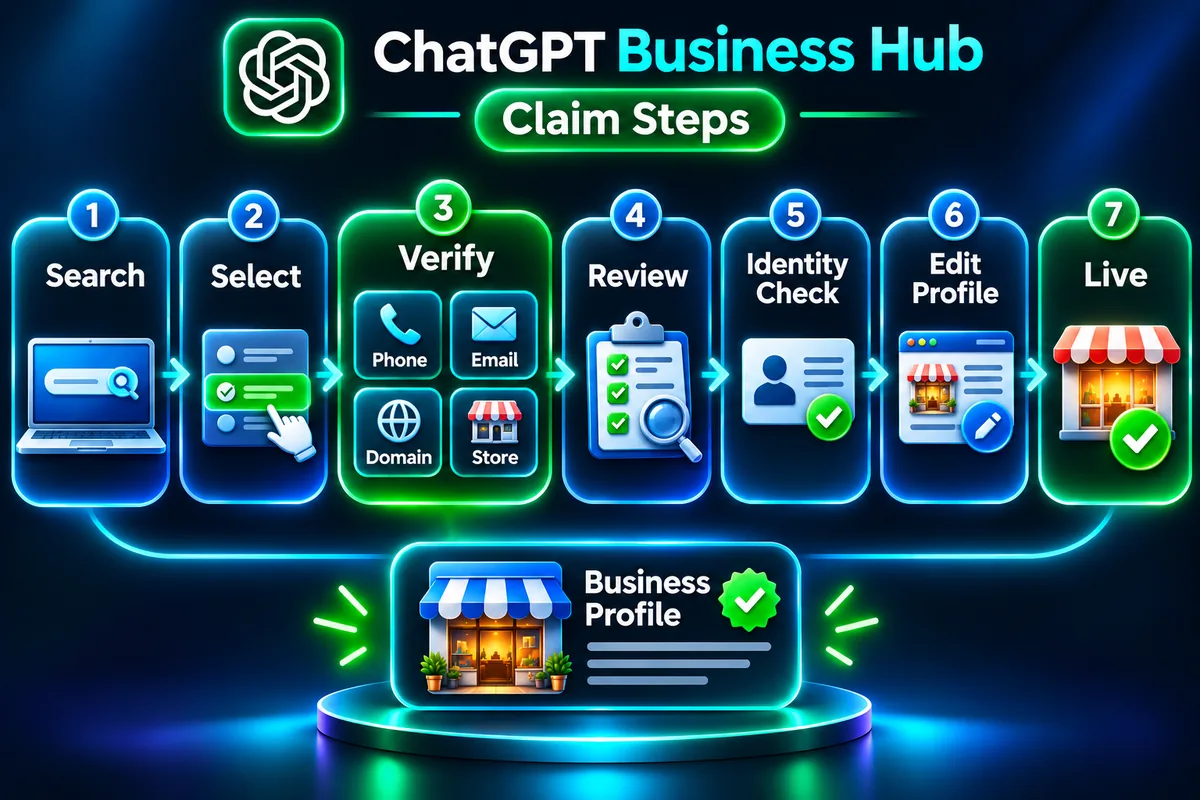
Alt text: Seven-step ChatGPT Business Hub claim flow: search, select, verify by phone, email, domain or store, review, identity check, edit profile, go live
AI image prompt
"3:2 horizontal flow of seven connected steps with simple icons: search, select, verify, review, identity check, edit profile, live. The verification step shows four small method icons: phone, email, domain, store. Highly vivid, hyper-realistic rendering combined with a clear infographic layout. Tell the story visually with large recognisable icons, realistic objects, arrows, checkmarks, colour-coded states and simple diagrams so a viewer understands the message without reading any paragraph; only very short 1-3 word labels are allowed. Dark-theme premium look: glass cards, soft glow, cyan (#22d3ee), blue (#3b82f6) and green (#4ade80) accents on deep navy (#080b14). High contrast, no real brand logos, no fabricated OpenAI or ChatGPT interface, no invented statistics."
These steps follow OpenAI’s setup article. Screens may change during the beta.
- Sign in and open Business Hub. Use the ChatGPT sidebar or chatgpt.com/business-hub. Use an account tied to a business-owned email, not a personal or agency one.
- Search for your business by name and select the matching listing. If it does not appear, you may not be eligible yet.
- Confirm the account that will manage the business.
- Verify the claim. Choose business phone (SMS or call), business email code, website domain (add the TXT record in your DNS, then select Verify domain), or Shopify.
- Wait for OpenAI’s review. OpenAI emails its decision or asks for more information. You can cancel while it is under review.
- Complete the Persona identity check. This is separate from the claim. It is required to publish changes, view Insights, connect a product feed or set up an eligible agent.
- Edit your profile. OpenAI reviews changes before they go live.
A claim alone does not earn the verified badge. Add your agency as a team member rather than letting it claim the profile under its own account.
What to prepare before you claim
Most delays come from missing access, not from the form. Collect these first.
- A business-owned email on your own domain, for the account and for email verification.
- DNS access (or your web developer) to add a TXT record for domain verification.
- A working business phone that can receive SMS or calls, matching what is publicly listed.
- Identity and registration documents. OpenAI says you may need a government-issued ID, business registration information and proof you are authorised to represent the business. Keep them ready.
- Consistent facts across your website, Google Business Profile and directories: name, address, phone, hours, category and a plain-language description.
- Clean policy pages for delivery and returns if you sell products, because the profile has fields for them.
- A product feed in CSV that follows OpenAI’s feed specification, if you sell products online.
Need help with the technical side? See our website development and Google Business Profile services.
ChatGPT Business Hub Insights: what the numbers mean
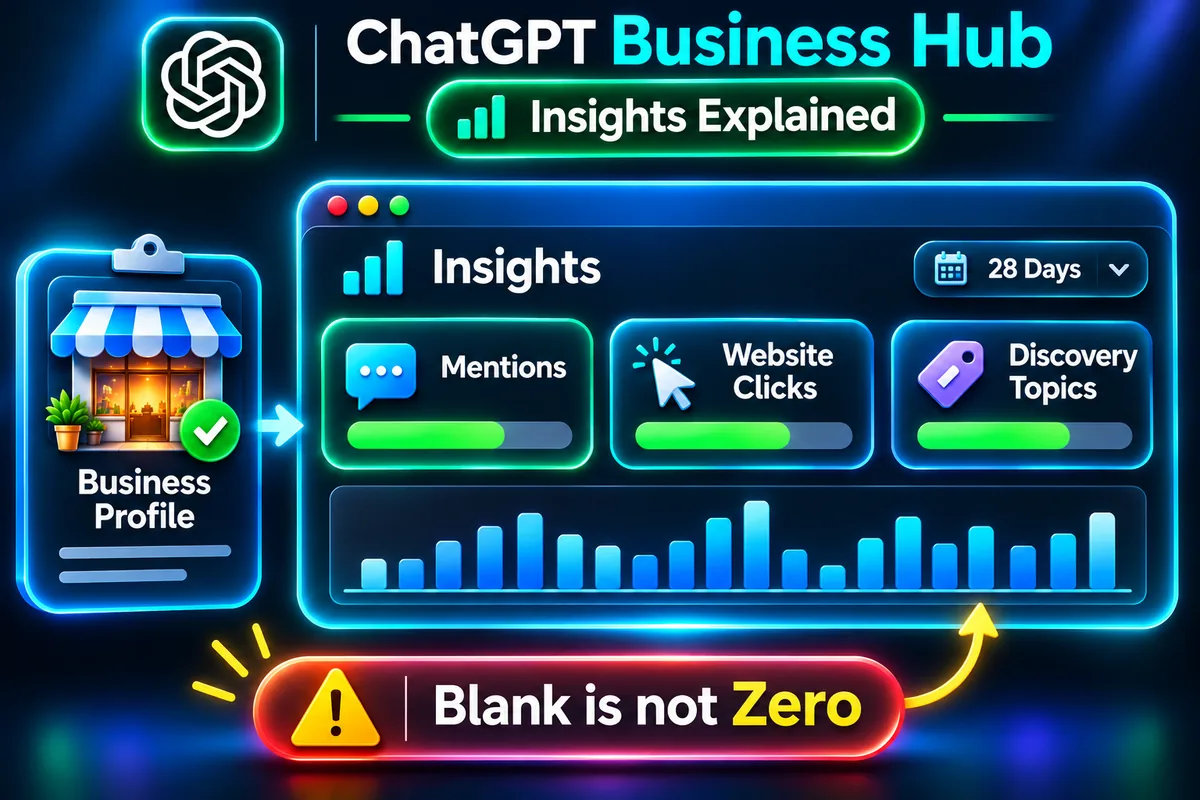
Alt text: ChatGPT Business Hub Insights dashboard for 28 days showing mentions, website clicks and discovery topics, with a warning that blank is not zero
AI image prompt
"3:2 dashboard-style panel with three metric tiles (Mentions, Website clicks, Discovery topics), a 28-day timeline bar, and a callout tag saying Blank is not zero. Use placeholder bars, no real numbers. Highly vivid, hyper-realistic rendering combined with a clear infographic layout. Tell the story visually with large recognisable icons, realistic objects, arrows, checkmarks, colour-coded states and simple diagrams so a viewer understands the message without reading any paragraph; only very short 1-3 word labels are allowed. Dark-theme premium look: glass cards, soft glow, cyan (#22d3ee), blue (#3b82f6) and green (#4ade80) accents on deep navy (#080b14). High contrast, no real brand logos, no fabricated OpenAI or ChatGPT interface, no invented statistics."
Insights show aggregate activity for the past 28 days. They are not conversation logs.
- Mentions: for online businesses, counted when ChatGPT references your website, not your brand name alone (per OpenAI’s help article).
- Website clicks: clicks from ChatGPT to your site.
- Discovery topics: common themes in conversations that cite your website.
- Blank is not zero. A blank metric can mean activity has not reached OpenAI’s reporting threshold. The threshold is not published.
- Privacy: OpenAI says it does not share users’ conversations or Business Agent chats with businesses.
- Gaps: no competitor comparison and no list of the questions people asked (as described by third-party reviewers; OpenAI does not list them).
Cross-check with your own analytics. Look for chatgpt.com in GA4 referral sources. Treat that as a HYPOTHESIS to test, since OpenAI does not document how Hub clicks appear in GA4.
Can Indian businesses use ChatGPT Business Agents?
Not yet, based on OpenAI’s own wording. A Business Agent is a labelled chat reached from a business’s ChatGPT profile that answers questions about its offerings.
- Availability: OpenAI says Business Agents are now available to eligible ecommerce and online service businesses in the United States.
- What it does: explains products and policies and links to your website.
- What it cannot do: complete purchases, make bookings or check orders (OpenAI help article).
- Separate from ChatGPT: the agent chat is labelled and distinct from ChatGPT’s own answers.
- Publishing: configuring or previewing an agent does not publish it. Customers can only chat with a published agent.
- Expansion: OpenAI plans more markets and categories but gives no dates.
Practical step for India: get the profile and information right now so you are ready if agents expand. Do not promise customers an agent that does not exist yet.
ChatGPT Business Hub vs Google Business Profile
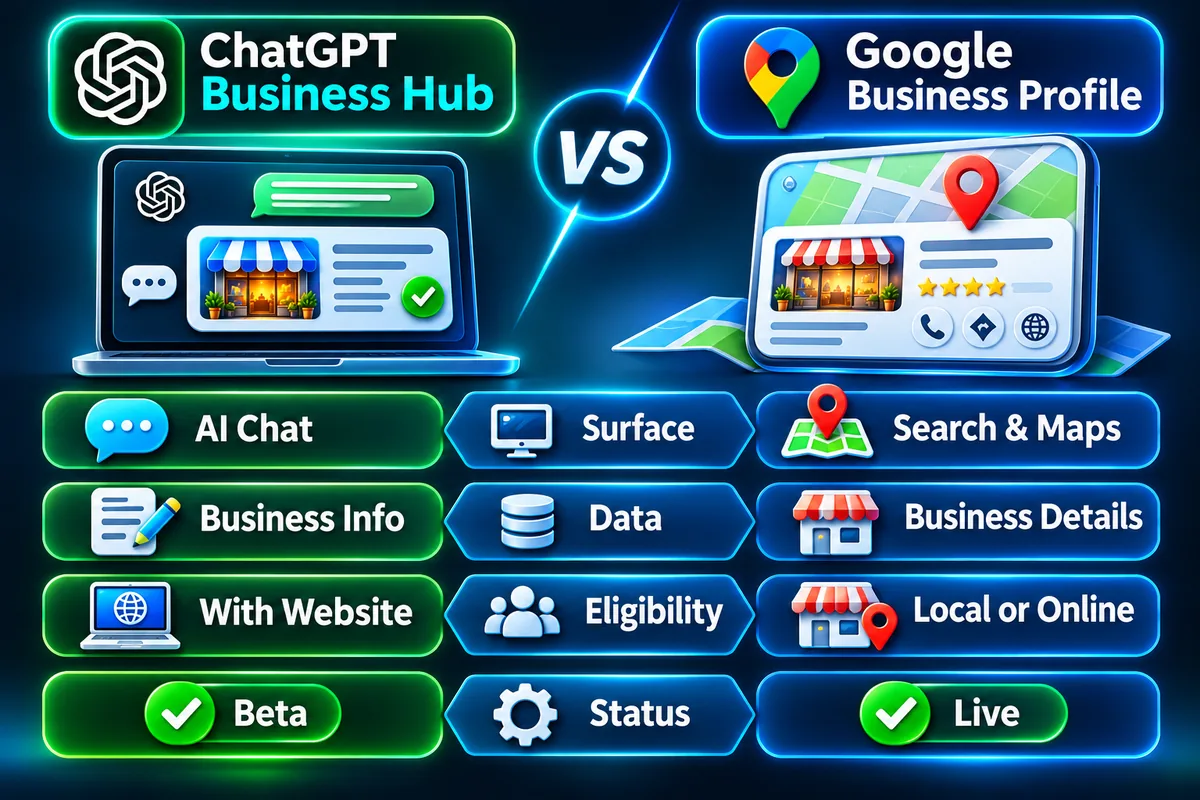
Alt text: ChatGPT Business Hub vs Google Business Profile: AI chat vs Search and Maps, business info vs business details, website-based vs local or online eligibility, beta vs live
AI image prompt
"3:2 split comparison: left panel a chat window with a profile card, right panel a map pin with a search result card. Four matching rows between them: surface, data, eligibility, status. Highly vivid, hyper-realistic rendering combined with a clear infographic layout. Tell the story visually with large recognisable icons, realistic objects, arrows, checkmarks, colour-coded states and simple diagrams so a viewer understands the message without reading any paragraph; only very short 1-3 word labels are allowed. Dark-theme premium look: glass cards, soft glow, cyan (#22d3ee), blue (#3b82f6) and green (#4ade80) accents on deep navy (#080b14). High contrast, no real brand logos, no fabricated OpenAI or ChatGPT interface, no invented statistics."
You need both if customers use both. They feed different surfaces.
| Aspect | ChatGPT Business Hub | Google Business Profile |
|---|---|---|
| Where it shows | Inside ChatGPT answers | Google Search, Maps and Google AI features |
| Status | Beta since 10 Nov 2026 | Established |
| Local India listings | Not open: local stores claim only existing U.S. listings | Open to Indian local businesses |
| Performance data | Mentions, website clicks, discovery topics (28 days) | Views, searches, calls, clicks, directions |
| Reviews | Not an editable part of the profile in the reviews we read | Core feature |
| Identity check | Persona (ID, registration info) | Google verification methods |
Our reading: Business Hub is closer to a profile plus a small Search Console for ChatGPT. For local discovery in India, Google Business Profile still does the heavy lifting.
Does claiming your business make ChatGPT recommend you?
No guarantee. OpenAI’s help article says connecting a feed does not publish an agent or guarantee that ChatGPT recommends your products. A claim gives ChatGPT correct first-party facts; it does not buy placement.
- Fix the facts first: a verified, complete profile reduces wrong details.
- Keep earning mentions elsewhere: third-party sites, reviews and press still shape what AI tools say. Our guide to getting cited by AI assistants covers that.
- Structure your site: clear pages, schema markup and an AEO checklist help machines read you.
- Do not confuse with ads: paid placements are a separate product. See ChatGPT Ads vs organic visibility.
Any agency promising “rank in ChatGPT after claiming” is guessing. Ask what they will measure instead.
Common problems and how to fix them
| Problem | Likely reason | What to do |
|---|---|---|
| My business does not appear in search | Not an eligible or existing listing, or location rule | Check eligibility above. If you are an online business, make sure your website is public and consistent. Re-check later, as the beta is expanding |
| Domain verification fails | TXT record not saved or DNS not propagated | Re-check the record at your DNS host, wait, then select Verify domain again |
| Claim stuck in review | OpenAI manual review | Watch your email for a request for more information. Reply with the documents asked for |
| Cannot edit profile or see Insights | Persona identity check not approved | Finish Persona. It is required to publish changes and view Insights |
| Someone else already claimed it | Ownership dispute | Use the dispute option shown during the claim (reported by BrightLocal). Do not create a duplicate |
| Insights are blank | Reporting threshold not reached | Wait. Blank does not necessarily mean zero activity |
Is ChatGPT Business Hub worth your time?
For most eligible Indian online businesses, claiming is low effort and low risk. It costs time, not a listed fee. Treat it as housekeeping, not a growth channel.
- Do it now if: you run an online store or service business with its own website and a business-owned email.
- Wait if: you are a local walk-in business. Prioritise Google Business Profile.
- Get support if: you manage several brands or branches, need a clean product feed, or your domain and DNS access sit with someone else.
Ktech can audit your information, prepare the feed and align your site for AI search. See our AI search optimization service or contact the team.
Frequently asked questions
Still have a question? Ask our teamChatGPT Business Hub is OpenAI’s dashboard at chatgpt.com/business-hub where eligible businesses claim their listing in ChatGPT, update key details, add product feeds after verification and view aggregate Insights. It launched in beta on 10 November 2026 as part of Businesses in ChatGPT.
Sign in to ChatGPT, open Business Hub, search for your business, select the listing, then verify by business phone, business email, website domain (DNS TXT record) or Shopify. OpenAI reviews the claim, then you complete a Persona identity check before you can publish changes.
OpenAI’s help article does not state a fee, and you do not need an ads account or a ChatGPT Enterprise agreement to claim. Some third-party coverage calls it free at launch, but we could not confirm that on an OpenAI page. Check the screens in your own account.
OpenAI says eligible businesses located where ChatGPT is available can claim. Online businesses with their own website look like the clearest fit. Local stores and restaurants can currently claim only an existing U.S. listing. Whether a specific Indian business is approved depends on OpenAI’s review.
Not strictly for every route, since phone and email verification exist. But eligibility for online businesses is built around a website, and domain verification is the most flexible method. If you only sell on Instagram or WhatsApp, build a website first.
No guarantee. OpenAI says connecting a feed does not guarantee ChatGPT recommends your products. Claiming gives ChatGPT accurate details from you, but recommendations also depend on other sources and on the question asked.
Business Hub is a profile dashboard for how ChatGPT represents your company to customers. ChatGPT Business is a paid workspace plan for teams using ChatGPT at work, renamed from ChatGPT Team in 2025. They are separate products.
Not based on OpenAI’s current wording. Business Agents are available to eligible ecommerce and online service businesses in the United States. OpenAI plans to expand to more markets and categories but has given no dates.
Aggregate mentions, website clicks and discovery topics for the past 28 days. For online businesses, a mention counts when ChatGPT references your website. A blank metric can mean the reporting threshold was not reached, not necessarily zero activity.
No. They feed different surfaces: Business Hub serves ChatGPT answers, while Google Business Profile serves Google Search and Maps. Most Indian local businesses should keep Google Business Profile as the priority.
You can use an agency for the work, but claim the profile under a business-owned account and add the agency as a team member. That keeps ownership with you if the agency relationship ends.
Sources7 references
- OpenAI — Introducing Businesses in ChatGPT (10 Nov 2026)
- OpenAI Help — Setting up your business on ChatGPT
- OpenAI Developers — Submit product feeds
- BrightLocal — ChatGPT launches Business Hub (11 Nov 2026)
- Stan Ventures — Claiming your ChatGPT business profile won’t get you recommended
- Digital Dawn — ChatGPT Business Hub for Indian businesses
- Free Press Journal — OpenAI launches Businesses in ChatGPT (11 Nov 2026)
Date checked: 24 November 2026. Statements about eligibility, steps and Insights come from OpenAI’s launch post and help article. Statements about India acceptance, pricing and local behaviour come from third-party coverage and are marked as such. We did not claim a profile ourselves, so India approval and Persona document acceptance are not tested.
Found this useful? Share it with business owners, marketers and web teams who want their business to show up correctly in ChatGPT.
A quick share helps someone make a better decision. Send it to a colleague or post it to your network.
Want your business ready for ChatGPT?
Speak with Ktech Media Solutions about claim readiness, accurate business information and AI search visibility.